---
title: How can I connect my digital assets to AMC?
description: This article will explain to you how to manage your digital assets for Alerter
---
[Skip to content](https://help.adcore.com/how-can-i-connect-my-digital-assets-to-amc#main-content)
English
Show submenu for translations
[Couldn't find an answer? Contact us.](https://help.adcore.com/kb-tickets/new?hsLang=en)
![Adcore-\_White\_Logo.png\]](https://help.adcore.com/hs-fs/hubfs/Adcore-_White_Logo.png?height=28&name=Adcore-_White_Logo.png)
- [Adcore's Blog](https://adcore-6962858.hs-sites.com/https/www.adcore.com/blog)
- [Netflix Advertising](https://lp.adcore.com/netflix_advertising)
Open main navigation
Close main navigation
- [Adcore's Blog](https://adcore-6962858.hs-sites.com/https/www.adcore.com/blog)
- [Netflix Advertising](https://lp.adcore.com/netflix_advertising)
- English
Show submenu for translations
- [Couldn't find an answer? Contact us.](https://help.adcore.com/kb-tickets/new)
- Visit adcore.com
Visit adcore.com
Hello, How can we help you?
- There are no suggestions because the search field is empty.
1. [Help Center](https://help.adcore.com/?hsLang=en)
2. [Alerter](https://help.adcore.com/alerter?hsLang=en)
# How can I connect my digital assets to AMC?
## This article will explain to you how to manage your digital assets for Alerter
In order to have your digital assets (such as your product feed, website, etc.) protected by Alerter, you need to connect them to AMC.
To do so, click "Manage Assets"
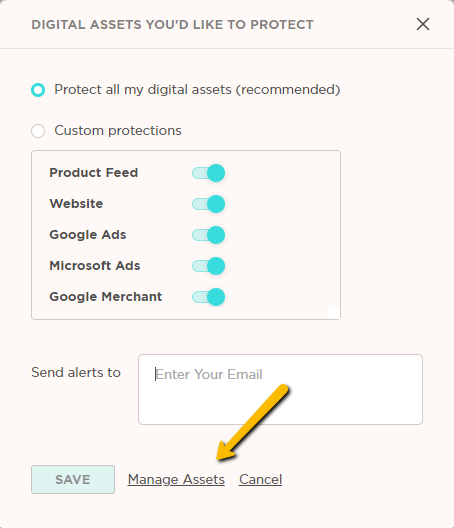
Or click  from the Protection Settings tab;
Or go to Settings located at the top right and choose between Accounts, Merchants, Feeds or Websites
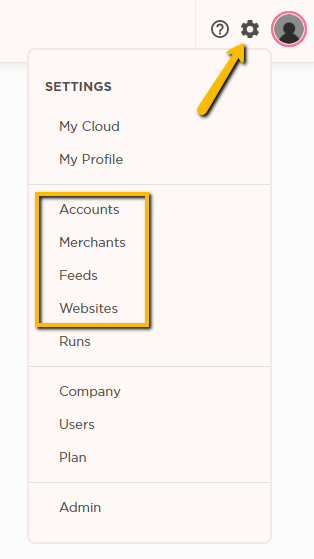
Once there, click the  icon to add and connect your digital assets to AMC.
- [Feeditor](https://help.adcore.com/feeditor?hsLang=en#main-content)
- [Editing a feed](https://help.adcore.com/feeditor?hsLang=en#editing-a-feed)
- [Feed Settings](https://help.adcore.com/feeditor?hsLang=en#feed-settings)
- [Effortless Marketing](https://help.adcore.com/effortless-marketing?hsLang=en#main-content)
- [Training Videos](https://help.adcore.com/effortless-marketing?hsLang=en#training-videos)
- [App Help](https://help.adcore.com/effortless-marketing?hsLang=en#app-help)
- [General Settings](https://help.adcore.com/effortless-marketing?hsLang=en#general-settings)
- [Alerter](https://help.adcore.com/alerter?hsLang=en)
- [SEMdoc](https://help.adcore.com/semdoc?hsLang=en#main-content)
- [Training Videos](https://help.adcore.com/semdoc?hsLang=en#training-videos)
- [Marketing Cloud](https://help.adcore.com/marketing-cloud?hsLang=en#main-content)
- [General Settings](https://help.adcore.com/marketing-cloud?hsLang=en#general-settings)
- [Personal](https://help.adcore.com/marketing-cloud?hsLang=en#personal)
- [Media](https://help.adcore.com/marketing-cloud?hsLang=en#media)
- [Views](https://help.adcore.com/views?hsLang=en#main-content)
- [Dynamic Campaign Creation](https://help.adcore.com/views?hsLang=en#dynamic-campaign-creation)
- [Training Videos](https://help.adcore.com/views?hsLang=en#training-videos)
- [Login issues](https://help.adcore.com/login-issues?hsLang=en)
- [Media Blast](https://help.adcore.com/media-blast?hsLang=en)
- [Feeditor Plus+](https://help.adcore.com/feeditor-plus?hsLang=en)
- [Effortless Feed](https://help.adcore.com/effortless-feed?hsLang=en)
- [Adcore's Blog](https://adcore-6962858.hs-sites.com/https/www.adcore.com/blog)
- [Netflix Advertising](https://lp.adcore.com/netflix_advertising)
[](https://www.adcore.com/)
Copyright © 2026, Adcore Inc.