---
title: How do I know when will the next scan start?
description: This article will explain about Alerter`s scan schedule
---
[Skip to content](https://help.adcore.com/how-do-i-know-when-will-the-next-scan-be#main-content)
English
Show submenu for translations
[Couldn't find an answer? Contact us.](https://help.adcore.com/kb-tickets/new?hsLang=en)
![Adcore-\_White\_Logo.png\]](https://help.adcore.com/hs-fs/hubfs/Adcore-_White_Logo.png?height=28&name=Adcore-_White_Logo.png)
- [Adcore's Blog](https://adcore-6962858.hs-sites.com/https/www.adcore.com/blog)
- [Netflix Advertising](https://lp.adcore.com/netflix_advertising)
Open main navigation
Close main navigation
- [Adcore's Blog](https://adcore-6962858.hs-sites.com/https/www.adcore.com/blog)
- [Netflix Advertising](https://lp.adcore.com/netflix_advertising)
- English
Show submenu for translations
- [Couldn't find an answer? Contact us.](https://help.adcore.com/kb-tickets/new)
- Visit adcore.com
Visit adcore.com
Hello, How can we help you?
- There are no suggestions because the search field is empty.
1. [Help Center](https://help.adcore.com/?hsLang=en)
2. [Alerter](https://help.adcore.com/alerter?hsLang=en)
# How do I know when will the next scan start?
## This article will explain about Alerter\`s scan schedule
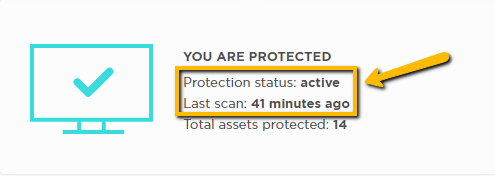
After executing the first scan, a scan schedule will be automatically activated to scan and protect your selected digital assets once an hour.
On the dashboard you can see the protection status and the time of the last scan
- [Feeditor](https://help.adcore.com/feeditor?hsLang=en#main-content)
- [Editing a feed](https://help.adcore.com/feeditor?hsLang=en#editing-a-feed)
- [Feed Settings](https://help.adcore.com/feeditor?hsLang=en#feed-settings)
- [Effortless Marketing](https://help.adcore.com/effortless-marketing?hsLang=en#main-content)
- [Training Videos](https://help.adcore.com/effortless-marketing?hsLang=en#training-videos)
- [App Help](https://help.adcore.com/effortless-marketing?hsLang=en#app-help)
- [General Settings](https://help.adcore.com/effortless-marketing?hsLang=en#general-settings)
- [Alerter](https://help.adcore.com/alerter?hsLang=en)
- [SEMdoc](https://help.adcore.com/semdoc?hsLang=en#main-content)
- [Training Videos](https://help.adcore.com/semdoc?hsLang=en#training-videos)
- [Marketing Cloud](https://help.adcore.com/marketing-cloud?hsLang=en#main-content)
- [General Settings](https://help.adcore.com/marketing-cloud?hsLang=en#general-settings)
- [Personal](https://help.adcore.com/marketing-cloud?hsLang=en#personal)
- [Media](https://help.adcore.com/marketing-cloud?hsLang=en#media)
- [Views](https://help.adcore.com/views?hsLang=en#main-content)
- [Dynamic Campaign Creation](https://help.adcore.com/views?hsLang=en#dynamic-campaign-creation)
- [Training Videos](https://help.adcore.com/views?hsLang=en#training-videos)
- [Login issues](https://help.adcore.com/login-issues?hsLang=en)
- [Media Blast](https://help.adcore.com/media-blast?hsLang=en)
- [Feeditor Plus+](https://help.adcore.com/feeditor-plus?hsLang=en)
- [Effortless Feed](https://help.adcore.com/effortless-feed?hsLang=en)
- [Adcore's Blog](https://adcore-6962858.hs-sites.com/https/www.adcore.com/blog)
- [Netflix Advertising](https://lp.adcore.com/netflix_advertising)
[](https://www.adcore.com/)
Copyright © 2026, Adcore Inc.