---
title: How to Submit an Appeal for a Google Ads Account Suspension
description: Learn how to appeal a Google Ads account suspension with our step-by-step guide. Follow these instructions to navigate the appeal process, understand policy violations, and get your account reviewed efficiently.
---
[Skip to content](https://help.adcore.com/how-to-submit-an-appeal-for-a-google-ads-account-suspension#main-content)
English
Show submenu for translations
[Couldn't find an answer? Contact us.](https://help.adcore.com/kb-tickets/new?hsLang=en)
![Adcore-\_White\_Logo.png\]](https://help.adcore.com/hs-fs/hubfs/Adcore-_White_Logo.png?height=28&name=Adcore-_White_Logo.png)
- [Adcore's Blog](https://adcore-6962858.hs-sites.com/https/www.adcore.com/blog)
- [Netflix Advertising](https://lp.adcore.com/netflix_advertising)
Open main navigation
Close main navigation
- [Adcore's Blog](https://adcore-6962858.hs-sites.com/https/www.adcore.com/blog)
- [Netflix Advertising](https://lp.adcore.com/netflix_advertising)
- English
Show submenu for translations
- [Couldn't find an answer? Contact us.](https://help.adcore.com/kb-tickets/new)
- Visit adcore.com
Visit adcore.com
Hello, How can we help you?
- There are no suggestions because the search field is empty.
1. [Help Center](https://help.adcore.com/?hsLang=en)
2. [Media Blast](https://help.adcore.com/media-blast?hsLang=en)
# How to Submit an Appeal for a Google Ads Account Suspension
## If your Google account has been suspended, you can appeal the decision by following a structured process through Google’s system. Here’s a step-by-step guide to help you navigate the appeal and ensure your case is clearly presented.
**Steps to Submit an Appeal**
#### **1. Access Your Google Ads Account**
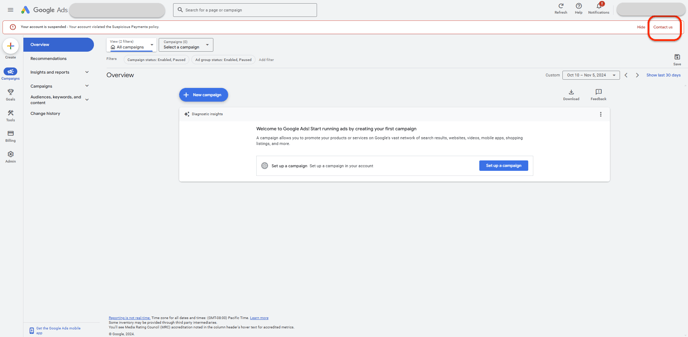
- Log in to your Google Ads account.
- A notification will appear at the top of the page, explaining which policy your account has violated.
- Click on **“Contact Us”** to initiate the appeal process.
#### ****
*Source: Google Ads*
**2. Review Policy Details**
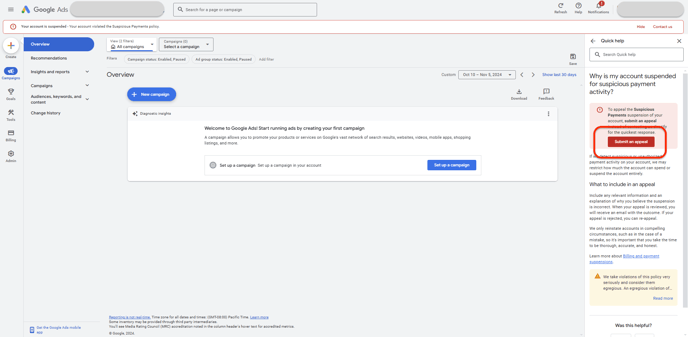
- After clicking, you will see specific information about the policy violation.
- Carefully read through these details to understand the nature of the violation and Google’s guidelines for appeals.
- Make sure you fully comprehend the policy requirements before proceeding to the next step.
#### ****
*Source: Google Ads*
**3. Complete the Appeal Form**
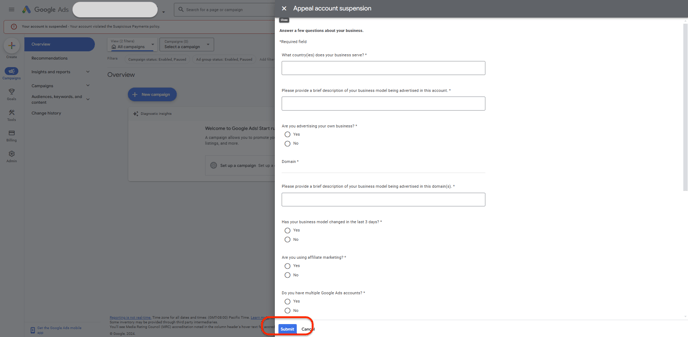
- You will be directed to a form with questions related to your business and the content promoted by your ad account.
- Take your time to read each question and answer thoroughly.
- Provide clear, detailed explanations regarding the policy violation to help Google understand your situation and intentions.
*Source: Google Ads*
**4. Submit Your Appeal**
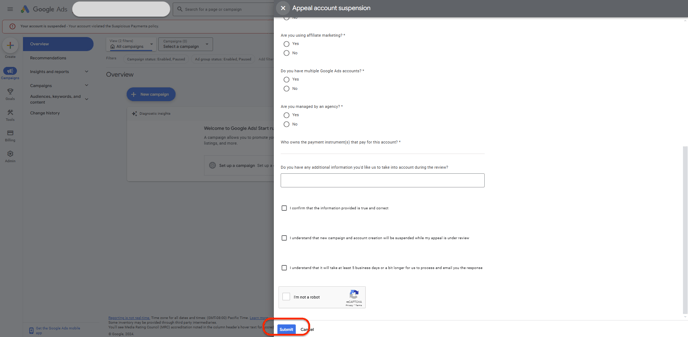
- Once you’ve completed the form, click **“Submit.”**
- After submission, allow a few days for Google to review your appeal.
- Google will notify you of their decision either via the Google Ads account page or through the email associated with your account.
*Source: Google Ads*
By following these steps, you can effectively submit your appeal for a suspended Google account. Ensure that you provide clear and detailed information to facilitate the review process. Good luck!
- [Feeditor](https://help.adcore.com/feeditor?hsLang=en#main-content)
- [Editing a feed](https://help.adcore.com/feeditor?hsLang=en#editing-a-feed)
- [Feed Settings](https://help.adcore.com/feeditor?hsLang=en#feed-settings)
- [Effortless Marketing](https://help.adcore.com/effortless-marketing?hsLang=en#main-content)
- [Training Videos](https://help.adcore.com/effortless-marketing?hsLang=en#training-videos)
- [App Help](https://help.adcore.com/effortless-marketing?hsLang=en#app-help)
- [General Settings](https://help.adcore.com/effortless-marketing?hsLang=en#general-settings)
- [Alerter](https://help.adcore.com/alerter?hsLang=en)
- [SEMdoc](https://help.adcore.com/semdoc?hsLang=en#main-content)
- [Training Videos](https://help.adcore.com/semdoc?hsLang=en#training-videos)
- [Marketing Cloud](https://help.adcore.com/marketing-cloud?hsLang=en#main-content)
- [General Settings](https://help.adcore.com/marketing-cloud?hsLang=en#general-settings)
- [Personal](https://help.adcore.com/marketing-cloud?hsLang=en#personal)
- [Media](https://help.adcore.com/marketing-cloud?hsLang=en#media)
- [Views](https://help.adcore.com/views?hsLang=en#main-content)
- [Dynamic Campaign Creation](https://help.adcore.com/views?hsLang=en#dynamic-campaign-creation)
- [Training Videos](https://help.adcore.com/views?hsLang=en#training-videos)
- [Login issues](https://help.adcore.com/login-issues?hsLang=en)
- [Media Blast](https://help.adcore.com/media-blast?hsLang=en)
- [Feeditor Plus+](https://help.adcore.com/feeditor-plus?hsLang=en)
- [Effortless Feed](https://help.adcore.com/effortless-feed?hsLang=en)
- [Adcore's Blog](https://adcore-6962858.hs-sites.com/https/www.adcore.com/blog)
- [Netflix Advertising](https://lp.adcore.com/netflix_advertising)
[](https://www.adcore.com/)
Copyright © 2026, Adcore Inc.